The Placer County Court calendar lists all scheduled court hearings and trial dates across the county. It allows litigants, attorneys, and the public to track hearing schedules and confirm when cases will be heard. This calendar covers civil, criminal, family, probate, and traffic matters, providing a clear view of upcoming court activities. By checking the calendar, users can see specific court dates, assigned judges, and hearing types. It helps prevent missed appearances and supports proper preparation for any scheduled session. The calendar is regularly updated to reflect changes such as rescheduled trials or cancellations. For anyone involved in a case, this is the primary reference for keeping track of court events.
Using the Placer County Court calendar ensures that both legal professionals and self-represented parties can stay informed about trial schedules and docket dates. Attorneys rely on it to coordinate hearings, manage case workloads, and avoid scheduling conflicts. Individuals representing themselves can plan travel, gather necessary documents, and arrange witnesses ahead of time. The calendar provides transparency by listing each case number, hearing type, date, and judge. Users performing a court dates lookup can access current information quickly and accurately. By consulting the calendar, everyone involved gains a clear understanding of upcoming court proceedings. It acts as a practical tool for organization and preparation in Placer County courts.
How to Search Hearings by Case Numbers
Finding upcoming court hearings in Placer County is straightforward using the official online portal. The system allows users to check the court hearing schedule, view hearing details, and follow the case timeline calendar. Both attorneys and individuals representing themselves can quickly find their cases by number or party name. The portal also lets users filter results by department, such as civil, criminal, family, or traffic. This ensures accurate results and helps plan appearances effectively.
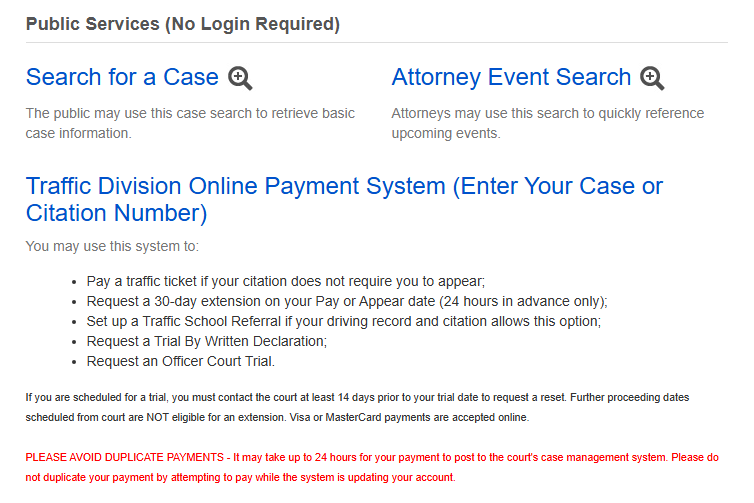
Go to the Portal
- Open the Placer County Superior Court’s official online portal: Official Case Search & Calendar Portal: https://webportal.placerco.org/ecourtpublic
- Accept any terms of use or disclaimers to enter the public search area.
- Once on the main page, you will see fields to begin your court dates lookup.
The portal lets anyone search public case information and access basic hearing dates without logging in.
Enter Case Number or Name
- In the search field, enter either a case number or the party’s last name.
- If you know the exact case number, the lookup will usually be faster and more specific.
- If you only have a name, make sure it’s spelled correctly so the system returns accurate matches.
This step retrieves basic case information from the court’s public database.
Filter by Department
After your initial search results appear, use filters to narrow down the court hearing schedule you need.
Common filters include:
- Civil – Property, contract, or damage disputes
- Criminal – Charges brought by the State
- Family – Divorce, custody, support cases
- Traffic – Citations, infractions, court appearances
These filters let users focus on specific calendars within the full docket.
View Scheduled Court Date
Once the correct case appears:
- Click or tap on it to open hearing dates.
- Review the list of upcoming events in the case timeline calendar.
- Look for the next scheduled hearing date, time, and department.
How the Placer County Superior Court Calendar Works
The Placer County Court calendar provides a detailed record of upcoming court sessions and scheduled hearings. It allows attorneys, litigants, and the public to track court sessions and confirm the timing of proceedings. This calendar serves as a reliable source for planning appearances, managing court hearing timelines, and ensuring all parties stay informed.
What the Superior Court Calendar Includes
The calendar offers a comprehensive view of cases and scheduled events, showing:
- Case numbers – Each matter is listed with a unique identifier.
- Hearing type – Identifies whether the session is a trial, motion, status conference, or other proceeding.
- Department – Indicates Civil, Criminal, Family, or Traffic court.
- Scheduled date and time – Clearly states when the hearing will occur.
- Assigned judge and courtroom – Shows which judge is presiding and the location of the session.
Weekly vs Monthly Schedule
- Weekly calendar: Displays all hearings scheduled for the current week, including any last-minute updates. This is ideal for attorneys and litigants who need immediate awareness of upcoming sessions.
- Monthly calendar: Provides a broader overview of cases for the month, useful for long-term planning or scheduling multiple hearings.
Types of Hearings Shown
The calendar highlights hearings across multiple departments:
- Civil: Property disputes, contracts, and other civil matters.
- Criminal: Cases involving charges brought by the State of California.
- Family: Divorce, child custody, support hearings, and related matters.
- Traffic: Citations, infractions, and scheduled court appearances.
How Often the Calendar is Updated
Regular updates ensure the docket list remains accurate and reflect the latest hearing dates. Checking the calendar frequently helps prevent missed appearances and keeps users aligned with courtroom scheduling. Using the Court Records and court sessions calendar effectively supports proper preparation for every case while providing transparency for all parties involved.
The Superior Court calendar is updated daily or as changes occur, including:
- New cases filed or scheduled
- Continuances and rescheduled hearings
- Cancellations or changes in courtroom assignments
Where to View the Official Placer County Court Calendar
To perform a court calendar lookup and see an up‑to‑date court hearing schedule, use the official online portal provided by Placer County Superior Court. This tool lets users search by case number, party name, department, or date range to find upcoming hearings and docket entries. Official Placer County Court Calendar Portal: https://webportal.placerco.org/ecourtpublic below is a simple walkthrough for how to use the portal to view official calendar information.
Walkthrough
- Open the Portal
Click the link above or paste it into your browser. The page will load an interface where you can begin a court dates lookup. - Accept Terms and Access the Search Page
On first visit, you may see a disclaimer or terms of use page. Agree to move on to the public search form. Once accepted, you’ll see search fields and filter options. - Choose How You Want to Search
The portal gives several choices for how to find your case or calendar entry:- Case Number: Enter the exact number for the fastest match.
- Party Name: Type the last name of an individual or business involved in the case.
- Date Range: Select a start and end date to pull all scheduled hearings in a specific range.
- Department Filter: Pick from Civil, Criminal, Family, or Traffic so you only see relevant results.
- Apply Filters and Run the Search
After entering your search terms and picking filters, click Search. The results will show cases or scheduled entries based on your criteria. - View Hearing Dates
In the results list, locate your case or group of calendar entries. Click any line to expand details. You’ll see the hearing schedule, including the date, time, courtroom, and hearing type.
Types of Court Calendars Covered
The Placer County Court system maintains separate calendars for different types of cases. Each calendar provides a detailed record of scheduled hearings and events. Understanding the distinctions helps litigants, attorneys, and the public quickly find relevant hearing categories and plan accordingly. Each calendar is structured to provide easy access to upcoming court sessions. Users can filter by case type, department, or date range, making it simple to track the progress of any matter. This organization ensures that all parties, whether legal professionals or self-represented individuals, can stay aligned with scheduled events. Regular updates also reflect any rescheduled hearings, cancellations, or newly added cases. By consulting the correct calendar, users save time and reduce confusion. Using these tools promotes transparency and accountability in Placer County courts.
Civil Court Calendar
The civil court calendar lists hearings for non-criminal disputes, such as contracts, property, or personal injury cases. The civil calendar typically focuses on the sequence of a case from filing to trial. It highlights important docket categories, ensuring attorneys and litigants know when motions, hearings, or settlement conferences are scheduled. This clarity helps parties plan document submissions and prepare for trial efficiently.
Key points include:
- Types of hearings: Trials, motion hearings, status conferences, and case management meetings.
- Timeline categories: Initial case filing, pre-trial motions, settlement conferences, trial dates.
- Purpose: Keeps parties informed about the civil court hearing schedule and deadlines.
Criminal Calendar
The criminal calendar tracks cases where the state brings charges against individuals or organizations. This calendar allows attorneys, defendants, and interested parties to see all scheduled court sessions in one place. It organizes proceedings by type, such as arraignments and trials, and helps ensure that all deadlines are visible. Using the criminal calendar efficiently supports timely appearances and case management.
Key points include:
- Arraignments: Initial court appearances where defendants hear charges and enter pleas.
- Trial dates: Scheduled dates for jury or bench trials.
- Other proceedings: Pre-trial motions, plea hearings, and sentencing dates.
- Purpose: Ensures defendants, attorneys, and the public can monitor criminal docket categories efficiently.
Family Law Calendar
The family law calendar covers domestic matters such as divorce and child custody disputes. It provides a clear schedule of hearings affecting family relationships and obligations. By tracking scheduled hearings by type, parties can prepare for mediation, custody arrangements, or support proceedings. This calendar ensures that families and attorneys remain informed about upcoming dates.
Key points include:
- Child custody hearings: Regular or emergency hearings to establish or modify custody arrangements.
- Divorce proceedings: Scheduling of trials, mediation sessions, and property settlements.
- Other matters: Support orders, restraining orders, and adoption hearings.
- Purpose: Helps families and legal representatives track critical scheduled hearings by type.
Traffic Court Dates
The traffic court calendar focuses on violations such as citations, moving violations, or infractions. This calendar allows drivers and attorneys to check hearing dates and ensure timely appearances. It organizes sessions for citation hearings, trials, and other related matters. By using this calendar, defendants can avoid penalties and keep track of required court attendance.
Key points include:
- Citation hearings: Scheduled dates for contesting tickets or paying fines.
- Traffic trials: Bench or jury trials for contested infractions.
- Other proceedings: DMV hearings or post-penalty reviews.
- Purpose: Enables defendants to confirm traffic court dates and avoid penalties.
Comparison Table of Court Calendars
| Calendar Type | Hearings Included | Typical Timeline / Docket Categories | Purpose / Notes |
|---|---|---|---|
| Civil Court Calendar | Trials, motions, status conferences | Initial filing → Pre-trial → Trial | Track civil case schedules, deadlines, and motions |
| Criminal Calendar | Arraignments, trials, sentencing hearings | Charges → Pre-trial motions → Trial → Sentencing | Monitor criminal proceedings, defendant appearances |
| Family Law Calendar | Custody hearings, divorce, support orders | Filing → Mediation → Hearings → Final judgment | Plan family law cases and track domestic court events |
| Traffic Court Dates | Citations, traffic trials, DMV hearings | Ticket issuance → Hearing → Trial / Resolution | Confirm traffic court appearances, avoid penalties |
Each calendar provides a structured view of scheduled hearings by type, allowing users to track cases efficiently and reduce the risk of missed dates. By referencing the appropriate calendar, parties can focus on relevant events without sifting through unrelated dockets.
Remote Appearance and Calendar Updates
As more court proceedings allow virtual participation, Placer County Superior Court provides a remote hearing calendar to help parties track online and telephone sessions. This system ensures that attorneys, litigants, and the public can see which hearings are eligible for remote appearance. By consulting the calendar, users can plan their schedule, register for remote sessions, and avoid missing important dates. The calendar integrates directly with the court’s official online portal, making it simple to confirm hearing times, courtroom assignments, and remote options. Using this tool reduces travel needs and streamlines participation for eligible cases.
How the Remote Hearing Calendar Works
The remote hearing calendar in Placer County Superior Court shows when select court sessions allow online or telephone participation. Many civil, family, traffic, and other hearings can be scheduled to appear by video or phone instead of in person, and those options are reflected in the official online hearing schedule when available. This helps users plan their remote court session and confirm dates on the court’s calendar portal.
Scheduling an Online Appearance
To request a remote appearance, parties often must schedule it through the court’s remote system or file a request form, depending on the type of hearing. For example, some hearings allow self‑scheduling no later than 15 hours before the start of the hearing, and those must be set for hearings appearing on the calendar within the next 30 days. After scheduling, the court will send a confirmation and a link to join the hearing online or by telephone.
Integration with the Court Calendar
The remote hearing calendar integrates with the general court calendar by indicating which sessions have a remote option. Once a hearing is set on the official calendar, eligible parties can see if it supports remote attendance, and then register accordingly. Some hearings, such as trials or contested matters, may require judicial approval or specific forms before remote participation is allowed.
Common Calendar Issues & How to Fix Them
Sometimes users may notice that a scheduled hearing does not appear on the Placer County Court calendar. This section addresses common problems and provides guidance to resolve them efficiently.
Missing Hearing in the Calendar?
- Problem: A scheduled hearing does not appear when performing a court dates lookup.
- Why it happens: Cases may be newly filed or the hearing has been recently scheduled but not yet updated in the system.
- Solution: Wait at least 24–48 hours for the calendar to update. If the hearing still does not appear, contact the clerk’s office to verify the case and date.
Why Cases Might Not Show Yet
- Problem: A case number or party name returns no results.
- Why it happens: Some cases are confidential, sealed, or pending initial scheduling, so they may not appear in the public online calendar immediately.
- Solution: Confirm the case type with the court. For public cases, check back after a day or two, as updates may be delayed.
Time Zone Confusion
- Problem: Hearing appears at an unexpected time.
- Why it happens: The calendar may list times in the court’s local time zone (Pacific Time), which can differ from a user’s local zone.
- Solution: Always adjust the displayed time to your local time zone when planning your appearance. For remote hearings, double-check the invitation link or email from the court for accurate timing.
Frequently Asked Questions
This court calendar FAQ provides detailed answers for users looking to track hearings, verify case schedules, or understand how the Placer County Superior Court calendar functions. These answers address common concerns while ensuring users can confidently access hearing information.
How often is the Placer County court calendar updated?
The Placer County court calendar is updated regularly, often daily, to reflect newly scheduled hearings, changes to existing court dates, or cancellations. Updates may occur multiple times a day for certain departments, especially Civil and Family courts where schedules can shift frequently. Users should check the calendar close to the hearing date to ensure they have the most current hearing schedule information. The court also updates remote hearing availability when sessions are converted to telephone or video appearances.
Can I see past hearings on the calendar?
Yes, the calendar allows users to view past hearings for reference. This feature is useful for attorneys, parties, or researchers reviewing previous proceedings, including trials, motions, or case management hearings. Only public cases appear, so sealed or confidential hearings may not be listed. Reviewing past entries can help verify case progression, confirm that filings were heard, and support preparation for upcoming related matters.
How do I find my case on the calendar?
Finding a case is straightforward when using the official Placer County Court portal. Users can search by case number, party name, or citation number, and filter results by department such as Civil, Criminal, Family, or Traffic. Applying a date range filter ensures that only relevant upcoming hearings are displayed. For best results, use exact spelling and correct case numbers, and confirm that filters match the intended court department. The portal’s results include detailed hearing times, courtroom assignments, and hearing types to help parties plan attendance efficiently.
What if my hearing isn’t listed yet?
Some hearings may not appear immediately due to calendar update delays. Newly filed cases, confidential matters, or hearings scheduled within the last 24–48 hours might not yet be reflected. Users should allow some time for the system to update and then recheck the calendar. If the hearing is still missing, contact the court clerk’s office directly to confirm scheduling. This ensures there are no missed appearances and provides official verification of hearing dates and times.
Can I print the calendar?
Yes, the Placer County court calendar can be printed or saved as a PDF directly from the portal. Printing a copy of the calendar allows users to carry a physical schedule for court preparation, travel, or reference during remote hearings. The printed version will typically include the case number, hearing type, scheduled time, courtroom, and department, ensuring that all essential details are captured. This is especially useful for parties managing multiple cases or attorneys preparing for several court sessions in the same week.